
For pharma process & tech-transfer teams
The P&ID everyone can open, comment on, and trust.
PFDs and P&IDs in the browser, drawn with the real ISA-5.1 symbols. Share a link, and everyone works on the same version, with every change on the record.
Start in minutes, no card, no IT ticket. Share a link, reviewers join free.
- Curated ISA-5.1 symbol library
- ISO 10628 flow diagrams
- Comments pinned to the drawing
- Locked, attributable version history
Where it breaks down
The drawing everyone works from
has no source of truth.
It lives between two systems of record: your validated documents and the engineering master. It belongs to neither.
THE CURRENT REV
A reviewer asks which revision is current. Three PDFs in three emails give three answers.
THE MARKUP
Your client's QA redlines come back as a photographed printout on page 3 of an email thread.
THE MASTER FILE
The Visio master lives on one laptop. The person who owns it is on leave.
Validated system of record
Veeva Vault · ValGenesis
The Gap
Email · Drives · Photos
PharmaDiagrams
Engineering system of record
AutoCAD P&ID · SmartPlant
PharmaDiagrams closes that gap: one live drawing, always current.
Inside the editor
Real ISA-5.1 fidelity, in the browser.
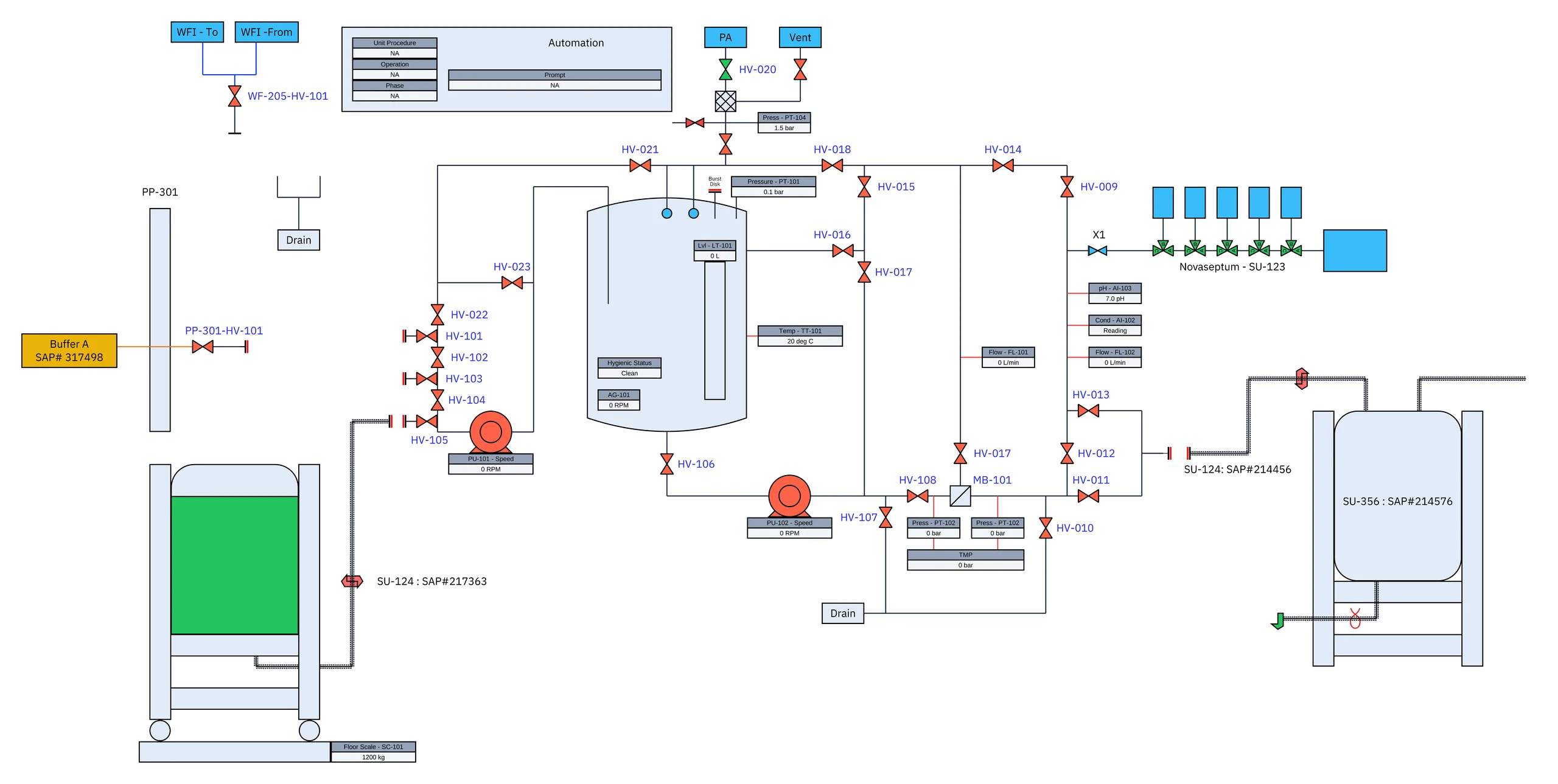
Every symbol is drawn to the standard itself, not approximated with a generic shape. Below, a UFDF skid straight from the editor.
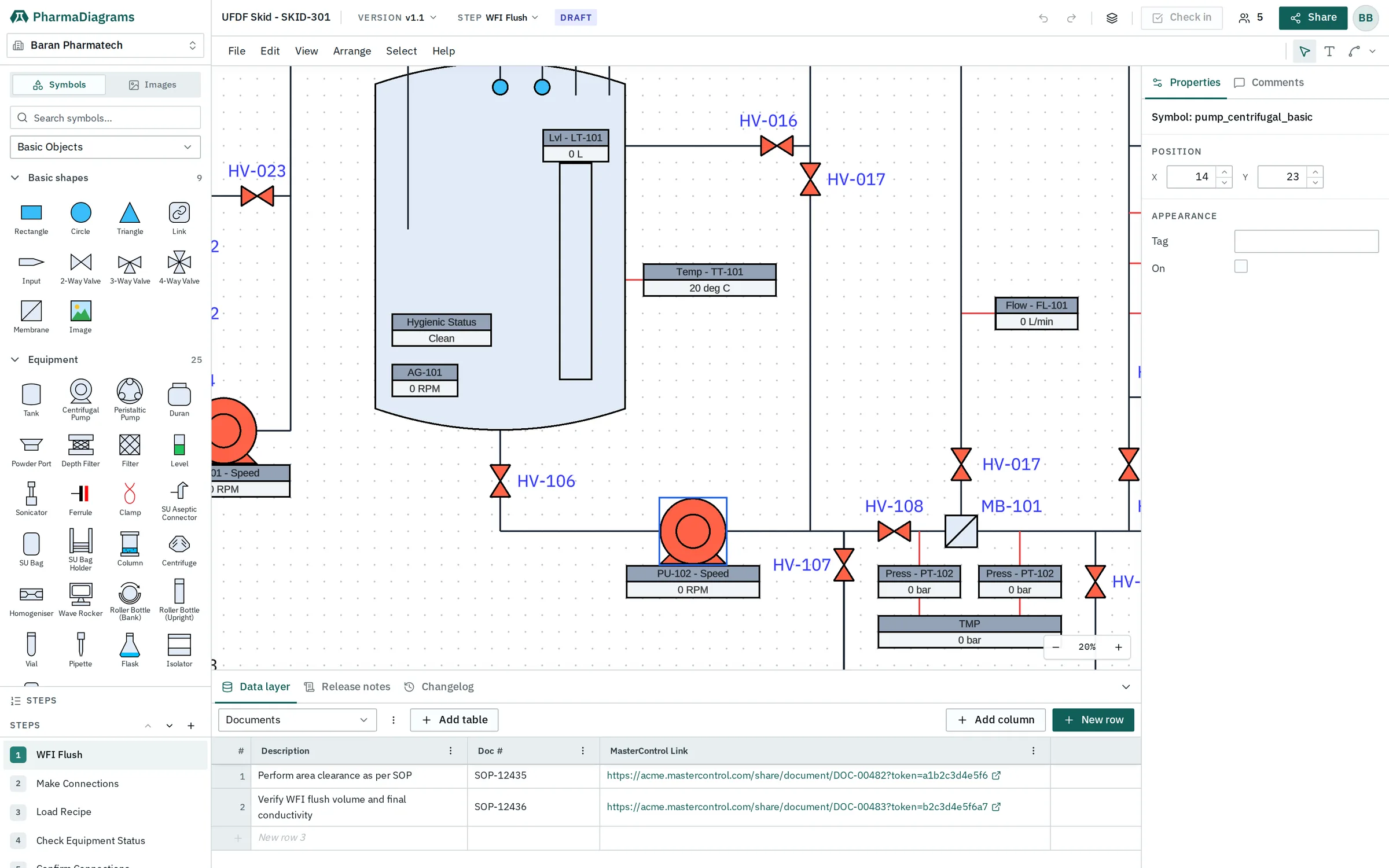
HV, FI, TT, PSV. Valve and instrument letters follow the standard, set in the properties panel, not typed by hand.
Equipment, instruments and fittings organised the way an engineer scans a drawing legend.
Vessels, pumps and exchangers drawn to ISO 10628 outlines, not generic boxes.
WFI flush, make connections, load recipe. One drawing, stepped the way the process runs.
The shared room
One link puts everyone in the same drawing.
Send a link, not an attachment. The client's QA, your process lead, and your QA open the same live P&ID, each with their own role. Presence shows who is in the drawing, and which version they are looking at, right now.
- VIEWWalk the live drawing in the browser. Nothing to install, no copy saved to a desktop.
- COMMENTPin questions to the symbol they are about. Threads stay on the drawing, not in email.
- EDITChange the drawing itself. Every edit attributed, every change in the history.
Roles are per person. Reviewers never need a paid seat.
Only the people you add can open the drawing, and only at the role you give them. Everyone signs in first. You can change or remove access at any time, and every open is logged.
How access works →In practice
Built for the moments a drawing changes hands.
Comments on the drawing, not a PDF
You issue a link, not an attachment. The client comments on the valve itself, anchored to the version under review. Nothing comes back as a scanned markup of page 4.
Redlines on the same sheet you see
Their package boundary, your battery limit, one P&ID. The vendor's redlines land on the version you are working from, with a name against every mark.
A handoff that reads as a deliverable
The tech-transfer package leaves with current P&IDs, the comment record, and the version history attached. The receiving site opens it in a browser and starts at the right version.
Redline the as-built where you stand
Walk the line with the current version open. Where the field disagrees with the drawing, mark it there. The as-built redlines reach the master before you are back at the desk.
One current version across sites
The launch site, the CMO, and the design office open the same version. When it changes, it changes once. Nobody builds against a drawing superseded last quarter.
The answer is already on file
The auditor asks which P&ID is current and who approved the change. The version record holds the answer (who, when, and why) without a week of assembling binders.
THE LIVING RECORD
One version history. Every change timestamped and attributed.
Every redline, every status change, every signature is recorded against the user, the time, and the hash of the drawing. Lock a version to issue a revision: frozen, content-hashed, and signed. The whole trail stays on the record, ready when the audit asks.
- TIMESTAMPEDEvery action carries an exact timestamp, down to the second.
- ATTRIBUTEDEvery change ties to a verified user, with no anonymous edits.
- LOCKED REVISIONSSign a version to lock it as a revision. The next edit opens a new version.
Initial issue. P&ID-001 drawn and issued for internal review.
Approved. P-301 loop revised, P-302 instrumentation added.
Signed by J. Morales · Hash: 4f3d8a...
In progress. 4 changes since v1.0 open comments.
Next version opens when v1.1 is approved and locked.
THE DATALAYER
The numbers travel with the drawing.
Equipment lists, line lists and design parameters live in a table keyed to each step on the canvas, and travel with the drawing through every version, so the as-built data and the drawing never drift apart.
| # | Name | Service | Material | Design Pressure |
|---|---|---|---|---|
| 1 | R-301 | Hydrogenation reactor | 316L SS | 6.0 bar |
| 2 | P-101 | CIP supply pump | 316L SS | 10.0 bar |
| 3 | E-205 | Jacket cooling exchanger | 304 SS | 12.0 bar |
| 4 | TK-204 | Buffer prep vessel | 316L SS | 4.0 bar |
| New row 5 |
How it compares
Generic diagram tools were not made for pharma.
| Feature comparison | PharmaDiagrams | Microsoft Visio | Lucidchart | draw.io |
|---|---|---|---|---|
| Symbol standard | ANSI/ISA-5.1, by name | Third-party stencils | Generic shapes | Generic shapes |
| Runs in the browser | Yes | Desktop-first | Yes | Yes |
| Reviewer cost | Free to view & comment | Paid seat | Paid seat | Free |
| Live multi-writer | Yes | Limited | Yes | Setup-dependent |
| Audit-ready versions | Locked & attributed | File copies | Basic history | File copies |
| Built for pharma | PFD & P&ID, only that | General-purpose | General-purpose | General-purpose |
Feature comparison as of June 2026. Trademarks are the property of their respective owners; PharmaDiagrams is not affiliated with or endorsed by them.
Pricing
Start free. Talk to us for a rollout.
Two editors free. Every reviewer free, always.
For engineers
The full editor, free. No card, no IT ticket.
- Full editor, curated ISA-5.1 library
- Two editor seats per organisation
- Up to 10 diagrams
- Share links to view and comment
- Comments pinned to canvas, symbols and datalayer
- Version history with audit trail
- Visio import, in beta
- Datalayer: equipment and line-list tables, custom schemas
- Copy and paste straight to Excel
- Export drawing to PNG
- 500 MB storage for images and uploads
- Viewers and commenters free, always
Teams & enterprise
Rolling it out across a team, or across sites. We scope it with you.
- Everything in the free plan, plus
- Editor seats for your whole team
- More storage, scaled to your rollout
- SSO / SCIM on the roadmap, scoped with you
- Centralised admin and user provisioning
- Tamper-evident audit log export
- 21 CFR Part 11-aligned audit trail
- E-signatures
- Priority support, founder-led onboarding
- EU data residency, DPA on request
- Your whole supply chain reviews for free
Who's behind it
Built by a recognised pharma software company.
PharmaDiagrams is made by Blynksolve, a software company built for pharma, not a generic diagram vendor. The same team helps you adopt it, so a regulated rollout never starts from a blank canvas:
- Migrate your existing Visio and PDF drawings
- Set up line lists, datalayers and your first package
- Onboard your reviewers
Digital twins for pharma manufacturing·Ireland

Winner · 2023
Innovation of the Year
Pharma Industry Awards

Nominee · 2025
Emerging Company of the Year
BioPharmaChem Ireland
FAQ
Frequently asked questions
- Does this replace my QMS or CAD?
- No. It works alongside the tools you already have. Your validated system of record stays in Vault or ValGenesis, and your regulated drawings stay in your CAD or P&ID software. PharmaDiagrams is the single source of truth for the working drawing while it moves between people.
- Does the version history support audit and review?
- Yes. Every edit, comment, and approval is timestamped, linked to a verified user, and protected with a tamper-evident hash. When you lock a version, it freezes into a revision, and the next change starts a new version.
- Can anyone who has the link open a drawing?
- No. A drawing is private by default, and a link does not make it public. People you add to a drawing get a specific role (view, comment, or edit) and sign in before they can open it. If you generate a public share link instead, it is read-only, it expires, you can revoke it at any time, and you can require the viewer to verify their email or sign in first. Either way, every open is logged.
- Can I export my work and take my data with me?
- Yes. You can export any drawing as a PNG to share, or as a JSON file that imports back into PharmaDiagrams with no loss. You can always take your work with you.
- Can I import from Visio?Beta
- Yes, in beta. Visio (.vsdx) import recognises common pharma stencils, maps them to ISA-5.1 and ISO 10628 symbols, and flags anything it does not recognise so you can check it. It is still in beta, so tell us if you hit a stencil it misses.
- Where is my data hosted?
- In the EU. Your drawings are stored in the European Union, and a data processing agreement is available on request.
- Is there a self-hosted or on-premise option?Enterprise
- Yes, for Enterprise customers. We can run a dedicated, single-tenant deployment for you, including in your own cloud account. Talk to us about what you need.
- Is there an API?Enterprise
- Yes, for Enterprise customers. API access is available for integrations. Talk to us about what you want to connect.
- Does it run entirely in the browser?
- Yes. The full editor, the ISA-5.1 symbol library, sharing, comments, and version history all run in a modern browser. There is nothing to install, no admin rights needed, and no IT ticket to get started.
Start here
Give the working drawing
a single source of truth.
Start free, no card needed. Talk to us for a team rollout.